Showing posts with label FACEBOOK. Show all posts

Saturday, May 9, 2015

Top 5 Internet Business Ideas to make you a Billionaire


Top 5 Internet Business Ideas to make you a Billionaire

Top 5 Lucrative Internet Business Ideas

Online business makes people to get more and more payment with no limits bub it just depends on how much you are concerned with your business. Online businesses has made many people to quit their jobs just because of the great amount of money they are getting from their self employed business which offers them to work from their homes.


Below are 5 most lucrative internet business ideas you should consider when you want to start your online business


1. Online Retailing 
2. Web Design and Blogging 
3. Affiliate Marketing 
4. Freelancing 
5. Social Media Consultant and lastly is Online Tutor
 Do you want to know how these ideas works?? 
Click here to go on to congressoturel

Thursday, April 23, 2015

Hello;Facebook's Dialer And Called ID App On Test


Hello;Facebook's Dialer And Called ID App


Facebook Hello app for Android release on 22 April surprise many users as it was rumored not to be true about its release.

Facebook's Dialer And Called ID App On Test


Hello app will help you to make calls, and it shows you who is calling and gives you the option of blocking incoming calls.Surprisingly! The app can show you all your Fb Contacts including those who have not listed them.

Hello;Facebook's Dialer And Called ID App On Test


All in all, Facebook developers are still on their early stage of testing the version, So things may change at any time. Lets wait....

Source Facebook

Saturday, April 18, 2015

Top 10 Of Most Popular Social Networks in 2015


The list of top ten of most popular social networking sites is given below with their complete ranking Quantcast positions as well as Alexa Rank both listed before their estimated unique monthly visitors.
worth to note that these ranks changes with time and the statistics given below is for April 2015
In summary these are Facebook, Twitter, Linkedin, pinterest, Google plus, Tumblr, instagram, VK, Flickr and Vine

Facebook
| 900,000,000 - Estimated Unique Monthly Visitors | 3 - Compete Rank | 3 - Quantcast Rank | 2 - Alexa Rank | April 1, 2015.


Twitter
 | 310,000,000 - Estimated Unique Monthly Visitors | 21 - Compete Rank | 8 - Quantcast Rank | 8 - Alexa Rank | April 1, 2015.


LinkedIn
 | 255,000,000 - Estimated Unique Monthly Visitors | 25 - Compete Rank | 19 - Quantcast Rank | 9 - Alexa Rank | April 1, 2015.


Pinterest
| 250,000,000 - Estimated Unique Monthly Visitors | 27 - Compete Rank | 13 - Quantcast Rank | 26 - Alexa Rank | April 1, 2015.


5 | Google Plus+
 | 120,000,000 - Estimated Unique Monthly Visitors | *32* - Compete Rank | *28*- Quantcast Rank | NA - Alexa Rank | April 1, 2015.


Tumblr
 | 110,000,000 - Estimated Unique Monthly Visitors | 55 - Compete Rank | *13* - Quantcast Rank | 34 - Alexa Rank | April 1, 2015.


 Instagram
| 100,000,000 - Estimated Unique Monthly Visitors | 49 - Compete Rank | 145 - Quantcast Rank | 36 - Alexa Rank | April 1, 2015.


vk
| 80,000,000 - Estimated Unique Monthly Visitors | *150* - Compete Rank |*120* - Quantcast Rank | 21 - Alexa Rank | April 1, 2015.


Flickr
 65,000,000 - Estimated Unique Monthly Visitors | 138 - Compete Rank | 139 - Quantcast Rank | 91 - Alexa Rank | April 1, 2015.


Vine
 | 42,000,000 - Estimated Unique Monthly Visitors | 237 - Compete Rank | 335 - Quantcast Rank | 1,172 - Alexa Rank | April 1, 2015.


Friday, March 27, 2015

All about Facebook F8 and How You Can Watch online


Facebook F8 Developer Conference 2015 - What to expect
Facebook F8 How to Watch online
Facebook's Mark Zuckerberg will  talk about the social network, Oculus Rift, WhatsApp, Messenger and more at the company's F8 developer conference


Here we cover what we expect to see the social media giant talk about about, and how you can follow it all online:
F8 - What to Expect
LiveRail-based ad platform

Among the lesser known of Facebook's acquisitions in recent years was video ad tech startup LiveRail which it purchased in July 2014. What we could see announced at F8 is an expansion of that service to sell ad space for other companies.

This could be a hugely powerful tool for Facebook, putting it in direct competition with Google's ad exchange and Twitter's MoPub. While a lot of the attention will be focused on Oculus Rift and WhatsApp developments at F8, for analysts and investors, what Facebook does with LiveRail will be much more important as it could significantly boost its revenues.
Facebook Phone

Not a piece of hardware but a new app which Facebook is said to be testing called Phone which would allow you make and receive phone calls without having to leave the Facebook universe at all. Facebook wants to own the mobile space and along with Messenger, Phone could allow it to expand its control over your smartphone experience.

The native dialler app would likely only work on Android as Apple's iOS is a very closed system. It is said to automatically block numbers which are commonly blocked and would work even if the person you are calling is not using Phone - which will be worrying for carriers.
News content within Facebook

Widely reported in the last week, according to the New York Times, "Facebook has been quietly holding talks with at least half a dozen media companies about hosting their content inside Facebook rather than making users tap a link to go to an external site."

Initial partners are said to include New York Times, BuzzFeed and National Geographic. This will be a major leap of faith for media companies who rely heavily on Facebook to help drive some of their 1.4 billion users to view their work.
Oculus Rift release date

This will be what grabs all the headlines, and Facebook has even set aside a special half hour keynote just for virtual reality-related news on Thursday, 26 March. What everyone wants to hear is a specific release date (and maybe even a price) for the consumer version of Oculus Rift.

Is that likely? Our heart says yes, but our head says no.
Messenger as a platform

Messenger, Facebook's standalone messaging app, recently rolled out a new feature to allow contacts to easily send money to each other. At F8, we expect Facebook will announce even more plans for its new app, with the goal of developing it into an even more established platform of its own. These plans could include adding more details about contacts and even adding the ability to view news through the app.
Internet.org

Zuckerberg's project to connect the five billion people without internet access is likely to get some air time at F8, after the CEO spoke about it recently at Mobile World Congress. Zuckerberg is trying to woo mobile networks around the world to work with him to give people access to the internet for free for services like news, weather and of course Facebook.
F8 - How to watch Facebook developer conference online?

Facebook's F8 event takes place on Wednesday, 25 March and Thursday, 26 March in the Fort Mason Center in San Francisco. There will be keynotes on both days, both starting at 10am local time.

Here are local times around the world for the event:
San Francisco - 10am
New York - 1pm
London - 5pm
Amsterdam - 6pm
Johannesburg - 7pm
Bangkok - midnight
Hong Kong - 1am (Tuesday)
Seoul - 2am (Tuesday)
Sydney - 4am (Tuesday)

The keynote on Wednesday, 25 March is simply titled Opening Keynote but on Thursday the keynote is split in two, with the opening 30 minutes devoted to Innovation at Facebook while the second half hour will focus on Why Virtual Reality Will Matter to You and will be given by Oculus chief scientist Michael Abrash.

To watch all the keynotes online, Facebook will be publishing a live stream here: f8.facebooklive.com

New facebook mission of providing internet by using aquila Drone-2015

image result for Facebook testing Aquila Drone
 Facebook test of Aquila Drone
Facebook is still on its mission of trying to connect the world by having an access of its own internet connecting point...
For now it is going to bring us the drones which will provide the internet connection to all parts of the world for easy access of Facebook
These drones are Boeing 737 which will be powered by sun rays(solar powered) with wings which have very small weight compared to that of small car

Tuesday, March 24, 2015

Facebook in EU Court of Justice

Facebook in EU Court of Justice about storerage of data collected from European users


The case, dubbed Europe vs Facebook, centres around what these companies do with data from customers based outside of their native US. Currently, data - often personal and sensitive - is sent to the US servers of Google, Facebook, Microsoft and others, but in doing so the data then becomes the property of the US legal system and is no longer under the jurisdiction of where it was created.

Concerns over how data collected by such companies came to light in 2013, when National Security Agency whistle-blower Edward Snowden claimed the agency was secretly accessing the private data of Facebook users. Snowden published documents revealing industrial-scale collection of data from users in the US and abroad, including millions of internet communication and phone records.

Using a programme called Prism, it was alleged that the NSA could access emails, videos, photographs, phone calls, social networking details, login names and passwords, and other data stored by US technology companies, including Facebook, Microsoft, Skype, Google, YouTube, Yahoo and Apple.

The case poses complex questions surrounding data protection, as under US law the data is protected differently to that held in Europe. The case was brought against Facebook Ireland Limited in the Irish High Court by Austrian law student Max Schrems.
'Adequate protection'

Under EU law, the transfer of data to another country is only legal if the exporting company, in this case Facebook Ireland Ltd, can ensure "adequate protection" for the data once it reaches the US. Schrems claims the current situation lets NSA programmes like Prism play "the exact antithesis" of adequate protection.

If successful, Schrems' case could force major changes to how US tech companies with European subsidiaries handle data collected here, and how it is processed once it reaches the US.

Schrems made a complaint to the Irish data protection commissioner in August 2014, claiming Facebook flouts privacy laws in its pursuit of expanding through commercial success - by selling the data given to it by users to advertisers. The student also claims personal data held by Facebook is no longer protected by European privacy laws because it is transferred to the US.

The case could not be investigated by the Irish High Court because it is covered by Safe Harbour, a legal convention set up in 1999 between Europe and the US which promises to protect EU citizens personal data. The decision was challenged and referred to the European Court of Justice.

Schrems' case has been crowd-funded by more than 2,000 donors who have raised over €60,000 (£44,000, $66,000) for his cause

Saturday, March 21, 2015

FB-ONLY tag [Try Phone] might be a Dialer Caller ID testing App


Facebook, as we know, generally does major interface updates to its application server-side, so users occasionally get seemingly random glimpses of new features or UI designs before they launch. The [FB-ONLY] tag on this button for Phone would seem to indicate somebody flipped the wrong switch, and this element went live before it was supposed to. Tapping the button to install or update it does nothing but throw you to a "no page found" error, which is probably because the application is stored internally on Facebook's intranet for security purposes.

What we can divine from this button is, well, not a huge amount - but then again, it does just seem to be a dialer replacement. Phone will block calls from commonly blocked numbers and show you detailed information about incoming calls, a lot like the Whitepages Caller ID app. Presumably, Facebook will also be anonymizing your incoming call data for marketing and research purposes, because why else would they want to release an app like this?

We don't know if or when Phone will come to exist as a thing publicly, but it does seem like Facebook is at least testing it.

Wednesday, March 18, 2015

Sending Money To Friends Through Facebook’s Messenger app

 Users of Facebook’s Messenger app will soon be able to send money to other users, and notably, it’s completely free of charge.

In a nutshell, it’s a very simple system that will allow the effortless movement of money between peers tethered to the Facebook network. When a user sends a payment to another user, the money is held by Facebook for a couple of seconds before being pushed through to the recipient’s bank, and if one is sent money without having linked it up to their bank / card, it is held securely until a card is added.


With folks sending money to each other on a regular basis via mobile-based systems, Facebook is lighting the blue touchpaper to a number of rivaling efforts, including the banks themselves. Should this Messenger-based system take off, Facebook will have a large portion of accounts linked to bank details, which adds significant value-per-user, and given how many people use the Messenger app, there’s a good chance that the peer-to-peer payments system could garner quite a following.

Within the Messenger app, there will be a small “$” sign used to initiate payments, located just above the keyboard. The sender then types in the amount, and the payee receives the sum with minimal fuss, and while there will naturally be one or two concerns about security, Facebook has this based covered as well.


With the PIN-based system in place (Touch ID for iPhone-based users), no payment can be sent without the credentials being entered, so if somebody happened to have access to your device, they wouldn’t be able too use it to send money without your permission.

As well as making the transfer of funds between users very easy and rendering Messenger a more valuable asset in general, Facebook is also well-placed for a more concerted push into the world of commerce, something that Mark Zuckerberg has made no secret of in the past

The roll-out of payments in Messenger will begin in the United States before expanding to other markets, supporting iOS and Android to begin with.

Sunday, March 15, 2015

These are 20 people who made us to enjoy the use of internet

Image result for Sir Tim Berners-Lee
these are twenty people who made us to enjoy the use of internet now and forever

Here We go……

1• Sir Tim Berners-Lee – World Wide Web


2• Vint Cerf And Bob Kahn – TCP/IP


3• Larry Page and Sergey Brin – Google Inc.


4• David Filo and Jerry Yang – Yahoo! Inc.


5• Bill Gates – Microsoft


6• Steven Paul Jobs – Apple Inc.


7• Mark Zuckerberg – Facebook


8• Chad Hurley and Steve Chen – YouTube


9• Linus Torvalds – Linux


10• Jack Dorsey – Twitter


11• Kevin Rose – Digg


12• Bram Cohen – Bit Torrent


13• Mike Morhaime – Blizzard Entertainment


14• Jimmy Wales – Wikipedia


15• Jeff Preston Bezos – Amazon


16• Shawn Fanning – Napster, Rupture


17• Pierre Omidyar – eBay


18• Jack Ma – Alibaba


19• Craig Newmark – Craigslist


20• Matt Mullenweg – WordPress


I hope With this post i have added something to Your knowledge today, Thanks for visiting,

keep visiting and Dont forget to recommend us on google.
LIKE OUR PAGE Kimjoh technology

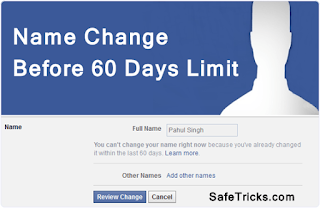
CHANGE YOUR FB PROFILE NAME BEFORE 60 DAYS LIMIT

facbook-change-name-before-60-days-limit

Do you want to change your Facebook profile name? here am going to teach you how to trick Facebook by changing your name in Facebook after you have changed within 60 days[two months] which is the FB's limit. 

 FOLLOWING THE FOLLOWING STEPS
1 First of go to 'Account settings' and click on 'Edit name' and confirm that Limit is currently present or not.


2 If the limit will be present Name will not be clickable and there should be a note about name change limit Which looks like.


You can't change your name right now because you've already changed it within the last 60 days. Learn more.


*After checking out limit if you want to continue to change name then Click Here


*Click on the Continue button. This link is actually for securing and recovering account from hacked. So we will use it to recover our account and it will let us to change name in further steps.


CHANGE YOUR FB PROFILE NAME BEFORE 60 DAYS LIMIT

*Change your Account password and but don't need to change any other information like email, mobile no etc.


*After continuing they will show that you have recently changed your account name.


*Then all the previously used names will displayed and select any of the listed name available there.


CHANGE YOUR FB PROFILE NAME BEFORE 60 DAYS LIMIT

Note:- By Using this method you can change name infinite time whenever you want but the limitation is that we cannot able to use new name. So if you want to use new name then you can try request form or only part which left is waiting for 60 days.
I hope you enjoy this trick and don't forget to share this with others also.

LIKE OUR PAGE Kimjoh technology

Monday, March 9, 2015

SEE THE LIST OF WORST COMMONLY-USED PASSWORDS

undefined
LOS GATOS, Calif. --

Los Gatos-based SplashData is out with its new list of the worst passwords and, yes, they're just as bad as you may think.

1. "123456" - which was also the worst last year.


2. "Password"


3. "12345"


4. "12345678"


5. "Qwerty"


The company analyzed the 3 million passwords leaked online last year and came up with the list by finding the most common passwords.

Remember, the harder the password is for you to remember, the more secure it is.

FACEBOOK ALLOWING USERS TO DESIGNATE 'EXECUTOR' OF PROFILE UPON DEATH


In life, Facebook is a go-to place for many to share with friends and family. But what happens to your profile when you die? Now, Facebook is giving users a say in that.

Facebook is announcing Thursday the option to designate an estate executor - someone who can log into your profile after your death, make a final post, approve friend requests, memorialize the page, and more.

Users will choose what Facebook calls a "legacy contact" - a family member or friend who can manage their account when they pass away. Once Facebook is told that a person has passed away, they memorialize the account and the legacy contact will be able to:


1 Write a post to display at the top of the memorialized Timeline (for example, to announce a memorial service or share a special message)

2 Respond to new friend requests from family members and friends who were not yet connected on Facebook

3 Update the profile picture and cover photo


If someone chooses, they may give their legacy contact permission to download an archive of the photos, posts and profile information they shared on Facebook. Other settings will remain the same as before the account was memorialized. The legacy contact will not be able to log in as the person who passed away or see that person's private messages, a Facebook release said.

Users can let Facebook know if they'd prefer to have their account permanently deleted after death.

"Until now, when someone passed away, we offered a basic memorialized account which was viewable, but could not be managed by anyone. By talking to people who have experienced loss, we realized there is more we can do to support those who are grieving and those who want a say in what happens to their account after death," the release said.

Here's how to choose a legacy contact:

iphone


1. Open your settings. Choose Security and then Legacy Contact at the bottom of the page.
2. After choosing your legacy contact, you'll have the option to send a message to that person.
3. You may give your legacy contact permission to download an archive of the posts, photos and profile info you've shared on Facebook.

Facebook also redesigned memorialized profiles to pay tribute to the deceased by adding "Remembering" above their name and making it possible for their legacy contact to pin a post to the top of their Timeline.

Facebook is introducing legacy contacts in the U.S. first and hopes to expand to more countries. Setting up a legacy contact is optional.

"Our team at Facebook is grateful and humbled to be working on these improvements. We hope this work will help people experience loss with a greater sense of possibility, comfort and support," the release said

Saturday, March 7, 2015

HOW TO STOP FACEBOOK FROM TREATING YOUR BLOG’S URL AS SPAM


REASONS WHY FACEBOOK IS A BLESSING FOR BLOGGERS AND WEBMASTERS

facebook

You know, Facebook is a leading source of referral traffic for many blogs! Thus, many bloggers treat this site as source of valuable traffic! Especially for new blogs, referral traffic from this site is very valuable. Because, organic traffic is something that new blogs don’t get to enjoy. Under such circumstances, referral traffic from Facebook comes handy! This is advantage number one.

Next come the aspect of social signals and its relation with SEO (Search Engine Optimization). You see, social signal is one among the 200 factors responsible for SERP (Search Engine Result Page) standings of a blog, in case of Google!

The better a blog and its content performs on social media, the better social signals it generates! So, it has become necessary for bloggers to make their blogs’ presence felt on social sites! Thus, this is the second advantage of using Facebook.


HOW DOES FACEBOOK TREATS THE URLS SHARED ON IT

Nowadays, Facebook is seriously directing its efforts towards keeping spammers and fake ids at bay. Basically, they are okay with the concept of users sharing URLs of various sites and blogs. But, at the same time, the alarming increase of spam links and fake ids have been of concern to them. Upon slight suspicion, they may treat a link as spam! This especially happens in the case of new sites and blogs, which don’t have much credibility.

facebook spam


WHY DO THEY TREAT YOUR BLOG’S URL AS SPAM?

The reasons are many. It may have happened that someone ‘reported’ your link as spam. Even over-aggressive promotion of a blog’s url on groups and wall may lead to it getting treated as spam.


SIGNS OF FACEBOOK TREATING YOUR BLOG’S LINKS AS SPAM

There are many signs that denote it. I’ll run through the main ones here.
Once your blog is labeled as spam, Facebook will ask you to fill up a ‘Captcha’ form to make sure that you are not a spammer, whenever you share its URL on your wall and updates!
It won’t allow you to share your blog posts and links on groups. Most of the time


s, a message saying ‘Oops seems like something went wrong’ will pop up when you try to share it!
If you fill the captcha form and share that link anyway, users who click on that link will be shown a warning stating that the link could be spam. Many users will freak out, seeing this, and stop right away!
Despite all this ban and obstacles placed on sharing your blog’s links, you may be able to share other blogs’ links without any trouble. This shows that Facebook doesn’t count you as a spammer, but it considers your blog to be spam!
facebook spam
HOW TO SOLVE THIS PROBLEM?

There are two main solutions to this problem. They are- using the Facebook URL debugger tool or starting a campaign to ‘clean the image’ of your blog.

#1 Facebook’s URL Debugger Tool
All you need to do is paste the link, which is being treated as spam, on this tool. Upon doing so, the link and its content will be combed through and its various components marked up.

This tool is also called the Facebook URL Linter tool. After combing through the link, it shows up potential issues etc. Further, it also clears Facebook’s cache of that link and refreshes it.
The effectiveness of this tool, in solving our problem, has been inconsistent though. Many people applaud this tool, while some claim it is of no help. Even I got inconsistent results using it. But still, it is worth giving it a try. Or else, you have the second method to try out!

#2 The ‘Image Clean Up’ Campaign

You’ll need help of your friends to accomplish the task using this method. This method comprises of asking your friends on facebook to click on your blog’s link and accessing the main blog.

Upon doing so, Facebook will come up with the warning message stating that the site could be spam. Ask your friends to click on the ‘Not Spam’ button and access the blog. When considerable amount of ‘Not Spam’ hits are recorded, your blog will come clean! This method is all about proving the credibility of your blog!


OVER TO YOU

They say prevention is better than cure. It is better to be careful about not being too aggressive in promoting links on Facebook. But, by mistake, if you happen to fall prey to it, you may use the above methods to solve the problem of being treated as a spam site. If you liked my post, do share it!

Saturday, February 14, 2015

Facebook Hashtag: How To Create A Hastag On Facebook.

A hashtag could be a tool on social networking sites like twitter, that allow people to search out all the recent information on the tagged topic.


A hashtag is like a sign ("#") followed by the topic's name
or a relevant keyword without spacing. A hashtag for Junior for instance, would be "#Junior." Though, the use of hashtag on social media network was first introduced by twitter, where users clicks on a hashtage to see and interact with a live feeds of tweets with the help of the hashtag, you can still use it on different websites as well, oven on Facebook when writing Facebook updates, you all be able to post relevant hashtags , or keywords.

INSTRUCTIONS TO CREATE A HASH TAG ON FACEBOOK.
(1) Log in to your Facebook account.


(2) Click on your Facebook profile at the top-right corner of Facebook page.


(3) Write a status update, concerning your required hashtag, within the white box tagged "What's on your mind?"Keep it short and to the purpose.

(4) Add the hashtag at the end or between your status update. A pounds (#) then the topic after it,without space.

(5) Press the "Enter" key to post the update to your page and share it to your Facebook friends, your hash tag is live with your Facebook update.

TIPS: You can add the hashtag within the middle of the update, instead of at the end. e.g, you can write "I got my first #Ipad todays" instead of " i got my first Ipad today.#Ipad"

To tag your friends in a posts, use "@" so that your friends names will appear at the drop down, choose your friends you wished to tag on the post.
That's all you need to create a hashtag on Facebook updates.comment bellow to tell us your stake and experience with the new Facebook hashtag.

Don't forget to drop your comments and observations,And like our page kimjoh technology 
 Thanks