Showing posts with label whatsapp. Show all posts

Saturday, April 18, 2015

How To Hide Last Seen in Whatsapp

image result for How To Hide Last Seen in Whatsapp

Whatsapp last seen feature can now be hidden easily in these latest versions without being any need of hustling to find apps on Google playstore as it previously was. Now , this Last seen feature con simply be hidden just by changing the privacy settings. Procedures you have to follow are listed below as follows

First; Open your Whatsapp Messenger
Second; Go to setting then click Account
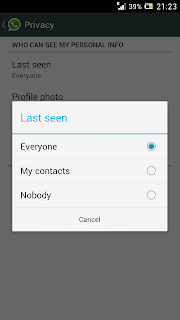
Third; Privacy then click Last seen
Fourth; Select last seen for Nobody.
Other options are everyone and my contacts as seen below on this picture


This is how simple it is!!


Run Two Or More Whatsapp Accounts On Android Smartphone/Tablet [How To]

Image result for Run Two Or More Whatsapp Accounts On Android Smartphone/Tablet


Google Androids and nearly all other smarthone are designed to run just one Whatsapp account. But for now it has been possible to run more than one Whatsapp accounts on your android smartphone by the great help of SwitchMe app which give you a chance to store data separately. Now if you want to get two or more than two whatsapp accounts on your phone or tablet you firstly have to download the app below which is from Google play

how to Run Two Or More Whatsapp Accounts On Your Android Smartphone/Tablet [How To]
Then install it in your Android and then add as many accounts as you can wit this simple app!


Run Two Or More Whatsapp Accounts On Your Android Smartphone/Tablet [How To]

Top 10 Of Most Popular Social Networks in 2015


The list of top ten of most popular social networking sites is given below with their complete ranking Quantcast positions as well as Alexa Rank both listed before their estimated unique monthly visitors.
worth to note that these ranks changes with time and the statistics given below is for April 2015
In summary these are Facebook, Twitter, Linkedin, pinterest, Google plus, Tumblr, instagram, VK, Flickr and Vine

Facebook
| 900,000,000 - Estimated Unique Monthly Visitors | 3 - Compete Rank | 3 - Quantcast Rank | 2 - Alexa Rank | April 1, 2015.


Twitter
 | 310,000,000 - Estimated Unique Monthly Visitors | 21 - Compete Rank | 8 - Quantcast Rank | 8 - Alexa Rank | April 1, 2015.


LinkedIn
 | 255,000,000 - Estimated Unique Monthly Visitors | 25 - Compete Rank | 19 - Quantcast Rank | 9 - Alexa Rank | April 1, 2015.


Pinterest
| 250,000,000 - Estimated Unique Monthly Visitors | 27 - Compete Rank | 13 - Quantcast Rank | 26 - Alexa Rank | April 1, 2015.


5 | Google Plus+
 | 120,000,000 - Estimated Unique Monthly Visitors | *32* - Compete Rank | *28*- Quantcast Rank | NA - Alexa Rank | April 1, 2015.


Tumblr
 | 110,000,000 - Estimated Unique Monthly Visitors | 55 - Compete Rank | *13* - Quantcast Rank | 34 - Alexa Rank | April 1, 2015.


 Instagram
| 100,000,000 - Estimated Unique Monthly Visitors | 49 - Compete Rank | 145 - Quantcast Rank | 36 - Alexa Rank | April 1, 2015.


vk
| 80,000,000 - Estimated Unique Monthly Visitors | *150* - Compete Rank |*120* - Quantcast Rank | 21 - Alexa Rank | April 1, 2015.


Flickr
 65,000,000 - Estimated Unique Monthly Visitors | 138 - Compete Rank | 139 - Quantcast Rank | 91 - Alexa Rank | April 1, 2015.


Vine
 | 42,000,000 - Estimated Unique Monthly Visitors | 237 - Compete Rank | 335 - Quantcast Rank | 1,172 - Alexa Rank | April 1, 2015.


Tuesday, April 7, 2015

How to run Android apps like WhatsApp and Instagram on Mac

ANDROID APPS ON MAC
How to run Android apps on Mac OS X. Dailymotion


Android Runtime for Chrome (ARC) is a tool that allows running Android apps via Chrome OS on the desktop. The app is automatically added whenever you install an Android app on your Chromebook. You can uninstall the extension by removing all the Android apps.

To run the apps you need:
APK for the app
PC, Mac, Linux, or Chromebook
Chrome version 41+
ARC Welder app

The apps on the desktop mostly function like those on an Android phone or tablet and users have the opportunity to enjoy Android apps which do not have any desktop alternative.

The ARC currently in the beta version can be used on Mac to install and run a few Android apps like WhatsApp messenger and Instagram.

Folks at iDownloadblog claim to have tested the aforementioned app on Mac OS X, which seems to have worked fine. However, there are a few caveats with Camera support and Google Play Services.

Check out the following guide if you want to run Android apps on Mac OS X (with Google Chrome OS version 41+).


Step-1: Add ARC Welder app to Google Chrome

Step-2: Download an Android app APK

Step-3: Launch ARC Welder and select a local directory

Step-4: Click the Add your APK button, then point to the APK which you downloaded earlier

Step-5: Click Download ZIP then click Save to save the file in the directory you created in step-3

Step-6: Open the directory from Step-3 and extract the ZIP file

Step-7: In Google Chrome click Windows>> Extensions and check Developer mode option

Step-8: Click Load unpacked extension and point to the directory where you extracted the file earlier and click Select

Step-9: Open Launchpad and click on the app icon to launch the app

Note that not all Android apps will support Mac. For more information check out the video walkthrough.

Friday, March 27, 2015

New WhatsApp Messenger released on 27 march... Install it from here!

WHATSAPP Cover art

image result for new WhatsApp Messenger - screenshot thumbnail

NO HIDDEN COST:

install it here from the trusted source Google play

★ MULTIMEDIA:

★ GROUP CHAT: Enjoy group conversations with your contacts.

★ NO INTERNATIONAL CHARGES: Just like there is no added cost to send an international email, there is no cost to send WhatsApp messages internationally. Chat with your friends all over the world as long as they have WhatsApp Messenger installed and avoid those pesky international SMS costs.
new WhatsApp Messenger - screenshot thumbnail


★ SAY NO TO PINS AND USERNAMES: Why even bother having to remember yet another PIN or username? WhatsApp works with your phone number, just like SMS would, and integrates flawlessly with your existing phone address book.
★NO NEED TO LOG IN/OUT: No more confusion about getting logged off from another computer or device. With push notifications WhatsApp is ALWAYS ON and ALWAYS CONNECTED.

★ NO NEED TO ADD BUDDIES: Your Address Book is used to automatically connect you with your contacts. Your contacts who already have WhatsApp Messenger will be automatically displayed.

★ OFFLINE MESSAGES: Even if you miss your push notifications or turn off your phone, WhatsApp will save your messages offline until you retrieve them during the next application use.

★ AND MUCH MORE: Share location, Exchange contacts, Custom wallpaper, Custom notification sounds, Landscape mode, Precise message time stamps, Email chat history, Broadcast messages and MMS to many contacts at once and much much m
ore

SOURCE; Google play 

Sunday, March 22, 2015

How to use WhatsApp with no phone number

Image result for whatsapp without PHONE number

Use WhatsApp Without Your Mobile Number

this method is to help you to use whatsapp without your mobile number for number of reasons like not being in need of making your number to be revealed to unknown people or for whatever the reason....

HERE IS WHAT YOU HAVE TO DO

1 If you are already using WhatsApp, uninstall it from your device completely. You can keep the SD card files i.e. the images if you want. Download and install it again.

2 Now when you open WhatsApp it’ll ask you to verify your phone number. It automatically sends a verification message to its server. But if this happens your number gets registered with them. So block your message service. You can simply put your phone on flight mode so that all network connections are disabled. You can alternatively change the message center number. Remember the old one of course.

3 It’ll ask you to choose an alternate method to verify. Choose ‘Verify through SMS’ and give your email address. Click on ‘Send’ and without waiting even for a second click on ‘Cancel’. This terminates the authorization process.

4 Now you have to spoof that message. You can try this for Android and Fake-a-Message for iOS.

5 Go to your Outbox -> Copy the message details to spoofer app -> Send it to spoofed verification.

6 Use the following details.
To: +447900347295
From: +(Country code)(mobile number)
Message: Your email address

7 A message will be sent through that spoofed number. You can use this number to connect with your friends.

I don’t know if you should be trying this or not. I don’t find it useful anyway. It’s always a good idea to use your real phone number

SIMPLEST WAY TO CHANGE PROFILE PICTURE OF YOUR FRIEND ON WHATSAPP


You can change your friend’s profile picture and it will work only on your phone.

i mean this change will not be globally.
WHATSAPP TRICKS
Here we go!

1  Choose a profile picture for your friend. Use Google Image search for cute looking monkeys and donkeys or weird looking people.
2  Resize the image to 561×561 pixels using Paint or Photoshop and name it with your friend’s mobile phone number.
Save the image in SD card -> WhatsApp -> Profile Pictures. Overwrite an existing image if required.

3  Disable WiFi and data network. If you don’t WhatsApp will automatically update the picture. Now show it to your friend who’ll panic instantly!

Note: This is not a hack, but simply a trick to change your friend’s profile picture only on your device. This is meant for fun purpose only.

Sunday, March 15, 2015

Whatsapp Voice Calling Feature for Android 2015-ENABLE IT!!!

Image result for Whatsapp voice call
VoIP hasn’t been officially rolled out to the masses on WhatsApp for Android, but it is buried within the very latest build, and if you’d like to check it out then the steps are below.


Before you dive in, there are a couple of things to consider. First and foremost, since WhatsApp hasn’t officially offered this out to everyone, it could, and probably will, have its fair share of bugs and imperfections. As VoIP is made available to all WhatsApp users, it’ll surely improve, but at this stage, don’t rely on it.

Also, as we have heard from beta testers, call quality is apparently not the best, so again, it’s not a service that you’ll want to rely on right now. Some early users have reported grainy coverage, but with time, things should get better.

Before you start, you will also require the assistance of another WhatsApp user.

So, with that out if the way, here’s what you need to do:

Step 1: Grab the latest version of WhatsApp for Android (2.11.561) from the Play Store here.

Step 2: Ask a user who has the feature call you through WhatsApp. You might have to ask friends of friends or associates, but as it spreads, more and more people will be able to get in on the act.

Step 3: After receiving your call, shut WhatsApp down and then re-open it.

Step 4: Check out the new tab for calls. From here, you can call your buddies over VoIP, and the more people you call, the more it will spread.


You’ll only be able to introduce friends that are running the latest version, and as aforementioned, you’ll only be able to join in if you have this recent build installed.A


LIKE OUR PAGE Kimjoh technology